Remember the old days of accounting? Everything lived on a single desktop computer in the office. If the computer crashed, you were in trouble. If you needed to check your numbers from home, you were out of luck. Cloud-based accounting completely changes that picture.
Think of it this way: instead of keeping your financial records in a physical filing cabinet (your office computer), you're now storing them in a highly secure, digital vault that you can access from anywhere with an internet connection. This simple shift gives you a live, up-to-the-minute view of your business's financial health, empowering you to make smarter decisions on the fly.
Why Cloud Accounting Is a Game Changer for Small Business

If you're still wrestling with desktop software or a jungle of spreadsheets, you know the headaches all too well. Your data is chained to one machine, making collaboration with your bookkeeper a clunky process of emailing files back and forth. Remote work? Forget about it. This outdated approach makes essential bookkeeping feel like a chore that drains your time and energy.
Cloud accounting cuts those chains. By moving your financials online, your business is no longer tied to a physical office. For a Washington business owner, that means you can check your cash flow from a job site in Spokane or approve payroll while grabbing coffee in Seattle. It’s about turning reactive record-keeping into a proactive financial strategy.
The Power of Real-Time Data
The biggest win with cloud based accounting for small business is having access to live financial information. With traditional methods, you’re often looking at a snapshot of your business that’s weeks, or even months, old. Cloud platforms, on the other hand, sync directly with your bank and credit card accounts.
This constant, automatic flow of data ensures your financial reports are always current. You get immediate clarity on the numbers that matter most, letting you answer critical questions instantly:
- Can we actually afford that new piece of equipment?
- Which of our services was most profitable last month?
- Are we on track to hit our revenue goals for the quarter?
This isn't about guesswork anymore; it’s about knowing exactly where you stand. That confidence allows you to spot and seize opportunities as they appear. Getting these fundamentals right is crucial, which you can read more about in our guide to the bookkeeping basics for small business.
A Foundation for Sustainable Growth
Moving to the cloud isn't just a tech upgrade; it's a proven strategy for growth. The market itself is exploding, with projections to hit $5.39 billion by 2025. But here’s the stat that really matters: businesses that fully embrace cloud accounting report 15% year-over-year revenue growth and acquire five times more customers than their counterparts who are still stuck on the desktop. You can dig into these market growth statistics on hrfuture.net.
This shift gives your business the agility it needs to scale. As you grow, your accounting system grows right alongside you, effortlessly handling more transactions, employees, and complexity without demanding expensive new hardware or painful manual updates. It’s a secure, scalable foundation for a strong financial future.
So, What Do You Actually Get with Cloud Accounting?

It’s one thing to talk about "the cloud," but it's another to see how its tools can completely change your workday. Think of a good cloud accounting platform as a digital toolkit for your business, where every single tool is designed to solve a real, time-sucking problem. These aren't just small upgrades; they’re features that hand you back control, clarity, and most importantly, time.
Let's pull back the curtain on the essential features that make cloud based accounting for small business a non-negotiable for anyone serious about growth. We’ll look at how each one directly impacts your day-to-day operations and your bottom line.
See Your Business Clearly with Live Dashboards
Could you imagine driving a car if the speedometer and fuel gauge only updated once a month? That’s what it feels like to run a business on outdated financial reports. You’re essentially driving blind, making big decisions with old information.
Cloud accounting fixes this with real-time financial dashboards. These dashboards become the command center for your business, giving you an instant, easy-to-read summary of your most critical numbers.
- Cash Flow at a Glance: Know exactly how much money is coming in and going out, updated daily. This helps you spot potential shortfalls weeks in advance.
- Real-Time Profit & Loss: See how profitable you are for the current week, month, or quarter without waiting for a bookkeeper to run a report.
- Overdue Invoices: A simple list shows who owes you money and for how long, so you can follow up quickly and get paid faster.
This up-to-the-minute visibility means you can make decisions with confidence, whether you're green-lighting a new purchase or planning for a historically slow season.
Ditch Manual Data Entry with Bank Reconciliations
Ask any business owner about their least favorite bookkeeping task, and bank reconciliation will likely be at the top of the list. The old way involves manually matching every single line on your bank statement to an entry in your books. It's tedious, mind-numbing, and a breeding ground for errors.
Modern cloud software automates this entire headache. By linking securely to your business bank and credit card accounts, the platform pulls in your transactions automatically every single day.
Smart software then suggests matches for you, connecting payments to invoices and debits to expenses. Instead of hours of manual grunt work, you just review and click "approve." For many businesses, this cuts reconciliation time by up to 80%.
Tame Payroll and Washington State Taxes
Payroll isn't just about writing checks. It’s a messy web of calculations, tax withholdings, and government deadlines. For those of us in Washington, it gets even more complicated with state unemployment (SUI), Paid Family and Medical Leave (PFML), and the lovely B&O tax.
Having payroll features built right into your accounting system brings all of this under one roof. The software calculates wages, deducts the right federal and state taxes, and can handle direct deposits for your team.
This integration is a lifesaver when it comes to compliance. The system keeps track of filing deadlines and helps generate the reports you need for state and federal agencies, drastically cutting the risk of expensive penalties for late or incorrect filings.
Find Your True Profit with Job Costing
If you run a service business, construction company, or creative agency, knowing the actual profit on each project is everything. Without proper job costing, you could easily be losing money on a client or service type and not even know it.
Job costing tools let you tag expenses—like labor hours, materials, and subcontractor invoices—to specific projects.
For example, a marketing agency can track the hours its team spends on a client’s monthly retainer. By stacking those labor costs up against the retainer fee, they can see which clients are actually driving profit. This kind of data is gold when it comes to pricing future work and deciding which services to focus on. For firms wanting to nail this down, finding the right professional services accounting software is a crucial first move.
Stop Guessing with Smart Inventory Management
For any business that sells a physical product, your inventory is basically cash sitting on a shelf. Mess it up, and you run into two big problems: overstocking, which ties up your money, or stockouts, which mean lost sales and frustrated customers.
Cloud-based inventory tools sync directly with your sales. When you sell an item, the system automatically adjusts your stock levels in real time. You can set reorder points to get an alert when you're running low, helping you buy the right amount of product at the right time. It’s a data-driven approach that makes sure your money is working for you, not collecting dust in a warehouse.
Keeping Your Financial Data Safe and Compliant
For a lot of business owners, the idea of moving sensitive financial data to the cloud raises one big question: what about security? It's a totally fair concern. Handing over your numbers can feel a bit like leaving your front door unlocked.
But the reality is, using a cloud-based accounting for small business platform is less like leaving the door open and more like moving your cash from a shoebox under the bed to a vault at a commercial bank.
The security infrastructure built by major cloud providers like QuickBooks Online or Xero is something a single small business could never hope to replicate on its own. These companies employ entire teams of cybersecurity experts whose only job, 24/7, is to protect your data. They’re using tools and protocols that are light-years ahead of what a typical office network can offer.
Understanding the Layers of Protection
Think of cloud security less like a single padlock and more like a series of interconnected safeguards. Each layer is designed to defend your information from different kinds of threats, creating a defense system that’s incredibly tough to crack.
Here are the core security features you should absolutely expect:
- Data Encryption: This is the process of scrambling your data into an unreadable code. Top-tier platforms encrypt your information both while it’s flying across the internet (in transit) and while it's just sitting on their servers (at rest). Even in the highly unlikely event of a breach, the data would be complete gibberish to anyone who got their hands on it.
- Multi-Factor Authentication (MFA): You’ve probably used this before. MFA requires a second piece of proof that it's you—like a code sent to your phone—in addition to your password. It's a simple step that provides a massive security boost, making it exponentially harder for a bad actor to get into your account.
- Continuous Security Audits: Reputable cloud software companies don't just set up their security and forget it. They undergo regular, rigorous audits by independent third parties to test their systems against strict security and compliance standards. This ensures they're always protected against the latest threats.
These features work together to create an environment that is often much safer than storing financial files on a local office computer, which is vulnerable to everything from theft and coffee spills to hardware failure and ransomware attacks.
Security in the cloud isn't an afterthought; it's the foundation. Providers like QuickBooks Online invest millions of dollars annually to maintain bank-level security, giving you enterprise-grade protection as part of your subscription.
Staying Compliant in Washington State
Beyond general security, your accounting system has to help you stay on the right side of local regulations. For businesses here in Washington, that means dealing with our unique payroll taxes and the Business & Occupancy (B&O) tax. These aren't just minor details; getting them wrong can lead to painful audits and expensive penalties.
This is where cloud accounting platforms really shine. Integrated payroll tools can automatically calculate withholdings for state-specific requirements like Paid Family and Medical Leave (PFML). They also help you track gross receipts with precision, making it so much easier to prepare and file your B&O excise tax returns on time. All that automation removes the guesswork and drastically cuts down on the risk of human error.
Handling Specialized Compliance Needs
Compliance isn’t just about payroll and sales tax anymore. It also extends to modern, and sometimes complex, assets. For instance, anyone investing in cryptocurrency faces some pretty unique tax reporting challenges. The IRS requires meticulous records of every single transaction to accurately calculate capital gains and losses on Form 8949.
Modern cloud-based tools can connect with specialized software that automates this entire headache. These integrations securely pull in trade data from various exchanges and wallets, reconcile your cost basis, and generate the exact tax forms you need. If you're curious, you can learn more about how blockchain technology intersects with accounting in our detailed guide.
Whether you're juggling state payroll or crypto gains, a well-configured cloud system is your best bet for staying audit-ready and fully compliant.
Your Step-by-Step Plan for a Smooth Migration
Thinking about moving your books to the cloud can feel overwhelming. I get it. It seems like a huge, complicated project. But when you break it down with a clear plan, it’s really just a series of manageable steps.
The key is treating it like any other important business project—with a clear beginning, middle, and end. We handle this process in three distinct phases: the "pre-flight check," the actual migration, and a final verification to make sure everything is perfect. With an expert team like Bugaboo Bookkeeping guiding you, you can sit back and relax while we handle the technical heavy lifting.
And while we're moving your data, security is always front and center.
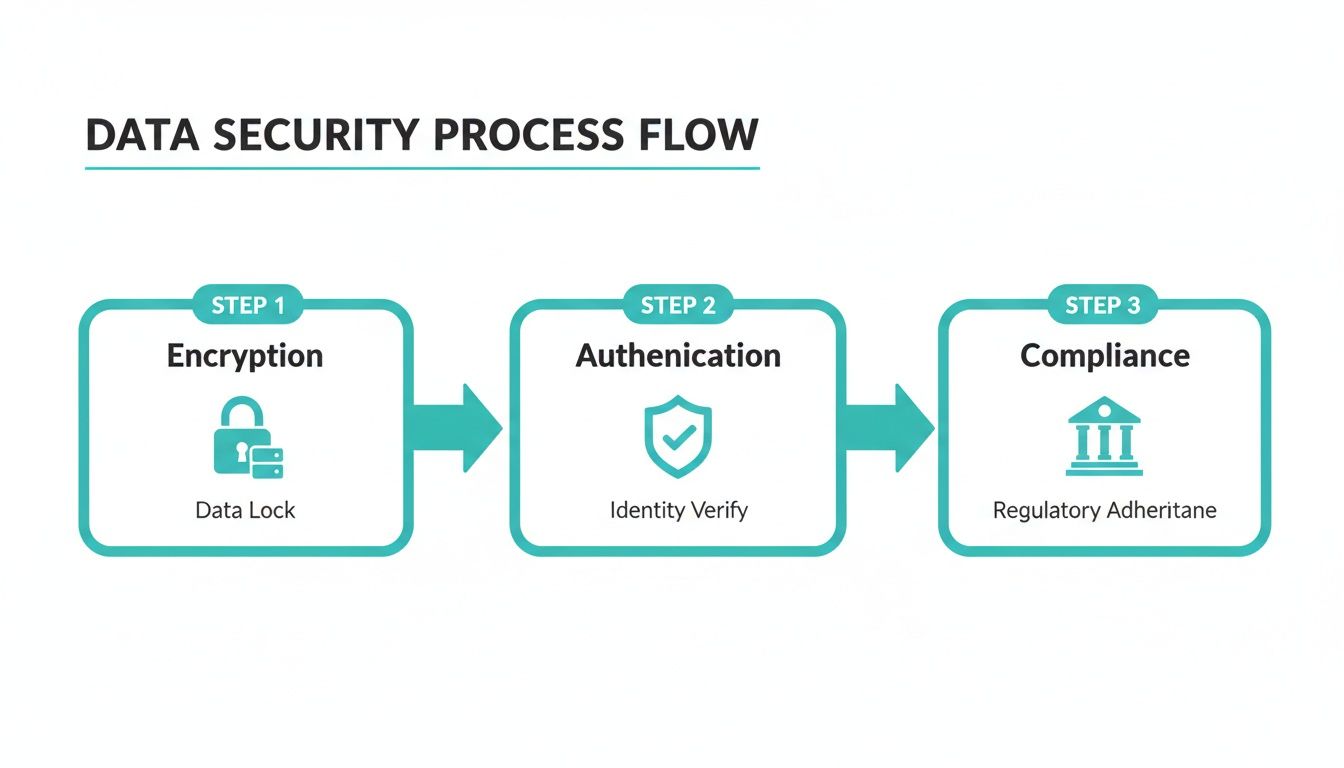
This process shows how encryption, authentication, and compliance work in concert to create a secure fortress for your financial information.
Phase 1: The Pre-Flight Check and Data Gathering
Before we move a single number, we need to get organized. This first phase is all about preparation. We'll work with you to gather all the necessary financial documents, making sure nothing gets left behind. Think of it like creating a detailed inventory before a big move.
Your part in this is pretty straightforward. You’ll just need to provide access to key financial information, including:
- Previous years' tax returns to set a clean starting point.
- Your current balance sheet and profit & loss statements.
- Detailed reports showing who owes you (accounts receivable) and who you owe (accounts payable).
- Login details for your business bank and credit card accounts so we can set up the live data feeds.
We'll give you a simple checklist to make this easy. We’ll also take a look at your existing chart of accounts and help clean up any old, messy data. This ensures you start on the new platform with a clean slate.
Phase 2: The Migration and System Setup
Once we have all the information, the real work begins. Our team takes the lead here, carefully migrating your historical data into the new cloud-based accounting system. This isn't a simple copy-and-paste job. It’s a meticulous process of mapping your old data to the new system, making sure every transaction and every figure lands in exactly the right spot.
A critical part of this is getting your past financial records imported correctly. For a platform like QuickBooks Online, this often means formatting data into specific file types for a seamless transfer. Our team has done this countless times, and you can get a sense of the precision involved by reading our guide on how to import transactions into QuickBooks Online.
After the historical data is in, we connect your bank feeds. This is where the magic happens, creating that automatic, real-time flow of transaction data that will save you so much time on manual entry down the road.
The entire industry is moving in this direction for a reason. Globally, 67% of accountants now prefer cloud software. It's not just us, either—by 2020, an estimated 78% of small businesses were running their finances in the cloud. This trend is a game-changer, especially since 60% of business owners admit they don’t feel like accounting experts. An expert-led cloud system fills that gap beautifully.
Phase 3: Post-Launch Verification and Training
Once the migration is complete, we don’t just walk away. The final step is to double-check everything. We'll perform a final reconciliation, comparing the balances in your new cloud system against your old records to confirm that everything matches down to the very last penny. This gives you total peace of mind that the transition was a success.
With your new system live and verified, the focus shifts to you. We'll provide clear, simple training to help you get comfortable. You’ll learn how to read your new dashboards and pull the reports you need to make smart business decisions.
This managed approach turns what could be a stressful tech headache into a smooth, hands-off experience. With the right partner, you'll be up and running on your new system in no time, ready to enjoy the clarity and control that cloud accounting brings.
What's the Real Cost and ROI of Cloud Accounting?
When you’re thinking about moving your books to the cloud, the first thing that comes to mind is usually the cost. "Is this going to be worth it?" It’s a fair question, but the answer isn’t just about the monthly subscription price. It's about the whole financial picture—what you save in time and headaches, what you gain in clarity, and the costly mistakes you sidestep.
Let's be honest, traditional desktop software has a sneaky way of costing more than you think. You pay a big chunk of cash upfront, but the spending doesn't end there. Soon you're shelling out for mandatory version upgrades, calling expensive IT support when it crashes, and maybe even maintaining a server. It's a cycle of unpredictable, often frustrating, expenses.
Cloud accounting completely changes that dynamic. You pay a simple, predictable monthly fee. No more surprise costs. No more budgeting guesswork. You're always on the latest version, and all the behind-the-scenes stuff—security, maintenance, updates—is handled for you.
Looking Beyond the Monthly Fee
The true value story isn't just about what you pay for the software; it's about the return you get on that investment (ROI). This is where cloud accounting really shines, and it shows up in a few key ways every single day.
-
You Get Your Time Back: How many hours do you or your team sink into manual data entry, hunting for receipts, or wrestling with bank reconciliations? Cloud platforms automate a huge chunk of that. For many small business owners, this means getting back several hours every week. That’s time you can pour back into making sales, talking to customers, or actually planning for the future.
-
You Make Smarter Decisions, Faster: When your financial data is live and up-to-the-minute, you stop guessing. You can see your cash flow right now, not where it was last month. You can check if a project is actually profitable while it's still in progress. This allows you to jump on opportunities and fix small issues before they snowball into massive, expensive problems.
-
You Cut Down on Costly Errors: Let’s face it, humans make mistakes. Manual bookkeeping is a minefield of potential typos and errors that can lead to big trouble—think tax penalties, compliance fines, or even getting a loan application denied. The built-in automation and accuracy of a cloud system slash those risks, saving you from future financial pain.
Picture this: you suddenly have a chance to apply for a game-changing business loan, but the bank needs your financials by Friday. With a cloud system, your reports are always clean, current, and ready to print. No panicked scramble. No late nights trying to get the books in order. Just the quiet confidence of having accurate numbers at your fingertips.
Predictable Costs Mean Better Business Planning
This sense of financial control goes beyond just the software itself. When you work with a firm like Bugaboo Bookkeeping, we manage your cloud accounting system for a straightforward, fixed monthly fee. That predictability is one of the most powerful tools a small business can have.
You can budget for your bookkeeping and payroll with total confidence, knowing there won't be any surprise hourly bills. This frees you up to focus your energy and your cash on what you're best at: running and growing your business.
Ultimately, combining powerful cloud software with expert management turns your bookkeeping from a necessary evil into a strategic asset. It becomes the engine that helps you work more efficiently, make better decisions, and sleep a little better at night.
Choosing the Right Partner for Your Cloud Transition
Picking the right software is a great start, but it's only half the battle. To truly get the most out of cloud based accounting for small business, you need an expert partner to guide you through the process and beyond. The right firm doesn't just migrate your data; they become a true financial guide for your business.
This isn’t a decision to make on a gut feeling. You need a partner who gets your industry, understands your specific business goals, and knows the unique financial landscape here in Washington State. Think of it less like hiring a data entry clerk and more like bringing on a strategic advisor who can use your numbers to build a more resilient, profitable company.
Questions to Ask a Potential Bookkeeping Partner
Before you sign on the dotted line, it's critical to ask the right questions. This isn't about grilling them; it's a conversation to see if you're a good fit. Treat it like you're interviewing someone for a key role on your team—because that’s exactly what this is.
Here are a few questions that cut through the sales pitch and get to what really matters:
- What does your onboarding process look like? A vague answer here is a major red flag. A great firm will walk you through a clear, step-by-step process for moving your data, connecting your accounts, and setting you up for success right from the start.
- How do you handle Washington-specific taxes? Ask them directly about their experience with B&O tax filings, state payroll rules like PFML, and local sales tax complexities. You'll know pretty quickly if they have genuine local expertise.
- Who will I be communicating with? Will you be handed off to a junior staffer, or will you have a direct line to the experienced bookkeeper who actually knows your financials inside and out? Direct communication is key to getting quick, accurate answers when you need them.
- How will you help me use my financial data? Look for answers that go beyond just keeping the books tidy. Ask how they help clients actually understand their reports, spot important trends, and make smarter, data-backed decisions about things like cash flow and profitability.
What to Look for in a Financial Guide
Beyond their answers, pay close attention to the vibe you get. The best partners have a mix of deep experience, clear-cut processes, and a proven history of helping businesses just like yours grow.
The goal is to find a firm that provides more than just clean books. You need a partner who can translate your numbers into a clear story, giving you the insights needed to confidently navigate your business's future.
Keep an eye out for these signs of a high-quality firm:
- A Proven Track Record: They should have plenty of happy clients, good testimonials, and a history of long-term partnerships.
- Transparent Processes: Everything from their pricing to how they communicate with you should be simple, predictable, and easy to understand. No surprises.
- Industry-Specific Knowledge: A partner who understands the unique challenges and opportunities in your field is worth their weight in gold.
Choosing who to trust with your financials is a big deal. To get a better sense of the value a dedicated firm provides, check out our in-depth article on the benefits of outsourced bookkeeping for small business. The right partner can turn your accounting from a headache into one of your most powerful strategic assets.
Common Questions About Cloud Accounting
Making the leap to cloud accounting is a big decision, and it’s smart to ask questions. We hear a few common concerns from Washington small business owners all the time, so let's tackle them head-on.
Is My Financial Data Actually Safe?
It’s a fair question, and the answer is a resounding yes. Think of it this way: your data is almost always safer on a major cloud platform than it is on a single office computer.
Leading platforms like QuickBooks Online use the same kind of bank-level security your own financial institution does, complete with heavy-duty data encryption and multi-factor authentication. These companies pour millions into their security infrastructure—far more than any small business could—to protect your information from theft, damage, or ransomware.
Can I Switch in the Middle of the Year?
You absolutely can. While starting fresh on January 1st feels clean, there's no hard-and-fast rule that says you have to wait. Business needs don't always line up perfectly with the calendar.
An experienced bookkeeper can handle the transition anytime. We perform what’s called "catch-up" bookkeeping, where we import your historical data and meticulously reconcile everything up to a specific cut-off date. This ensures the switch is smooth and your numbers are spot-on, no matter when you decide to make the move.
The software doesn't replace your bookkeeper—it empowers them. Cloud accounting automates the tedious, time-consuming tasks, freeing up your financial pro to focus on what really matters: strategic advice. With real-time data at their fingertips, they can offer much deeper insights into your cash flow, profitability, and growth opportunities.
What If My Business Has Unique, Industry-Specific Needs?
This is where modern cloud based accounting for small business really shines. It's not a one-size-fits-all solution. The real power comes from its ability to integrate with hundreds of specialized apps.
Whether you need to track billable hours for a service business, manage complex job costs in construction, or handle detailed product inventory for retail, there's an app for that. A good bookkeeping partner won't just set you up on a generic system; they'll build a custom tech stack that gives you the precise reports and data you need to run your specific type of business effectively.
Ready to see how the clarity and control of cloud accounting can benefit your business? Bugaboo Bookkeeping specializes in managing the entire transition for Washington businesses. We provide the expert setup and ongoing support you deserve.