

For any professional services firm—consultants, lawyers, accountants, you name it—time tracking is the engine that drives the business. It’s how you record what’s client work and what’s internal, and for anyone billing by the hour, it’s the absolute bedrock of your revenue.
The Real Cost of Uncaptured Billable Hours
Let's get straight to the point: sloppy time tracking isn't just an admin headache. It's a direct leak in your firm's profitability. The problem isn't people trying to be dishonest; it’s all the little things that slip through the cracks. The quick five-minute email. That ten-minute call to a client for a quick clarification. The brief bit of research you did. None of it makes it to a timesheet, but it adds up—fast.
This isn't about micromanaging or chasing pennies. It's about plugging a hole that could be costing you thousands of dollars every single month. The moment you stop seeing time tracking as a chore and start seeing it as a critical tool for financial health, you’re on your way to reclaiming that lost income.
Quantifying the Financial Leak
The financial hit from these "minor" oversights is usually a shock when you finally run the numbers. When your team tries to piece together their week on a Friday afternoon, they're guaranteed to forget those small chunks of work. It’s just human nature.
Industry research has shown time and again that firms with weak time tracking habits can lose 15–25% of their total billable hours every year. The good news? Firms that get serious about it often see their captured billable hours jump by a staggering 20–30% in the first few months alone. You can dive deeper into the data on how professional services reclaim lost time and boost their bottom line.
Picture a small agency with three consultants billing at $150 per hour. If each person fails to log just 30 minutes of billable work each day, that firm is losing over $5,800 a month. Annually, that’s nearly $70,000 gone, all from tiny, unrecorded tasks.
Beyond Billing A Deeper Impact
The damage doesn't stop at lost revenue. Poor time tracking sends ripples across your entire business, often causing a kind of hidden financial bleeding that can seriously stunt your growth.
Without accurate data, you’re left with:
- Inaccurate Project Bids: You're essentially guessing on future quotes if you don't know precisely how long past projects took. This puts you at constant risk of underbidding and working for free.
- Skewed Performance Metrics: It’s impossible to know which clients are truly profitable or which team members are most efficient. How can you make smart strategic decisions with blurry data?
- Reduced Operational Efficiency: You can't spot bottlenecks or find ways to improve your workflow if you have no real picture of where everyone's time is actually being spent.
Designing a Time Tracking Policy That Works
Before you even think about looking at software demos, you have to build a rock-solid time tracking policy. A fancy tool is completely useless without clear, consistent rules that everyone on your team actually understands and follows. Think of this policy as the foundation—it turns the vague idea of "tracking time" into a practical, firm-wide habit.
The whole point is to get rid of the gray areas. Your team should never have to guess what’s billable and what isn’t. That clarity starts by defining your activity categories with specific, real-world examples that reflect how your firm actually works.
Defining Billable vs. Non-Billable Time
Drawing a sharp line between billable and non-billable time is easily the most critical part of your policy. Let's be clear: non-billable time isn't "wasted" time. It's the essential investment you make in your own business—things like internal training, business development, and administrative work.
But if you don't separate it cleanly from client work, you’ll completely wreck your profitability metrics.
The best way to start is by creating a simple, comprehensive list. This is your first line of defense against billable hours getting lost in overhead and ensures your invoices are both accurate and easy for clients to understand.
- Billable Activities: These are any tasks directly tied to a client's project. Think client meetings, research, drafting documents, project management, and direct communication like calls or emails that fall within the project scope.
- Non-Billable Activities: These are the tasks required to run your business but aren't chargeable to one specific client. This bucket includes team meetings, professional development, networking events, and time spent creating proposals for new prospects.
To make this distinction crystal clear for your team, a table can be incredibly helpful. Here’s a breakdown of common activities we see in professional services firms.
Billable vs. Non-Billable Activity Examples
| Activity Type | Example | Classification | Policy Note |
|---|---|---|---|
| Client Communication | 30-minute phone call to discuss project revisions. | Billable | Must be logged with a note summarizing the discussion. |
| Business Development | Attending a 2-hour industry networking event. | Non-Billable | Log under "Business Development" or "Marketing." |
| Project Work | Drafting the initial legal brief for a client case. | Billable | Log against the specific client and project/matter code. |
| Internal Meetings | Weekly 1-hour all-hands team sync. | Non-Billable | Log under "Internal Meetings" or "Administration." |
| Professional Development | Completing a 4-hour online course for a new certification. | Non-Billable | Log under "Training" or "Professional Development." |
| Administrative Tasks | Spending 15 minutes organizing digital files for a project. | Billable | Small admin tasks directly supporting a project are often billable. |
This table is just a starting point, of course. You should customize it with examples that are specific to your firm’s day-to-day operations to eliminate any confusion.
This decision tree shows exactly how every tracked (or untracked) minute connects directly to your bottom line. It's a powerful visual for showing the team how small actions lead to significant financial leaks.
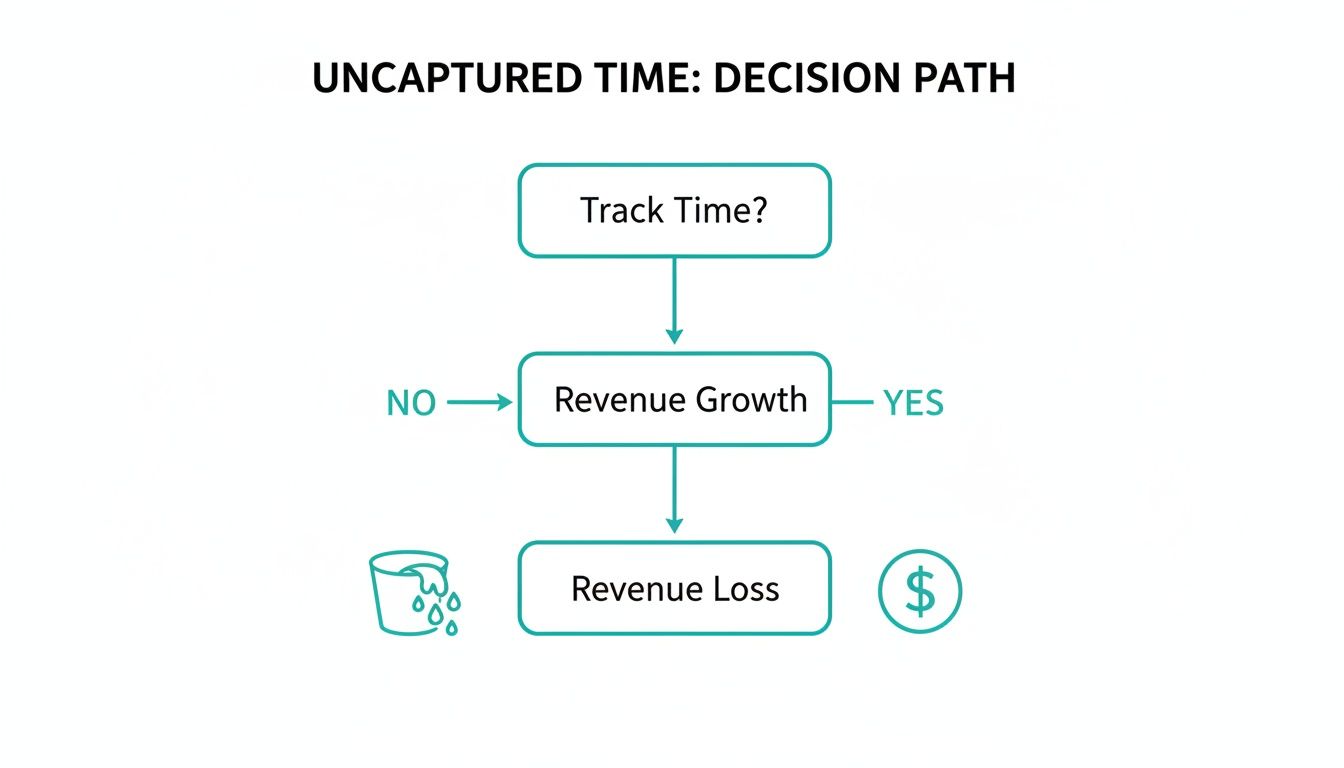
As you can see, the simple act of capturing time puts your firm on the path to revenue growth. Forgetting to do it is a guarantee of lost income. It's that simple.
Setting Clear Submission and Approval Rules
Once you've defined what to track, you need to nail down how and when it gets recorded and approved. Inconsistent entries create absolute chaos for billing and project management down the line. Your policy has to set firm expectations here to keep your data clean.
A daily submission deadline, for example, should be non-negotiable. Why? Because studies have shown that timesheet accuracy plummets after just 24 hours. People start guessing, and "close enough" becomes the enemy of profitability. A simple rule—"all time must be entered before you log off for the day"—can make a massive difference in captured billable hours.
A policy isn't about micromanaging; it's about creating a shared language for how your firm values and measures its most important asset—time. When everyone is on the same page, every entry contributes to the firm’s financial health.
Your approval process needs to be just as straightforward. Define who reviews and approves timesheets (is it a project manager or a department head?) and what the timeline is for that approval. This two-step process—submission then approval—is your safety net. It catches errors early, ensures people are following the rules, and adds another layer of financial oversight. You can find more great insights on this in our guide to small business accounting tips, which pairs nicely with these policies.
Finally, make sure your policy is flexible enough for different billing models. Hourly work is easy. But for retainers or fixed-fee projects, internal time tracking is just as crucial. It's the only way you'll know if a project was actually profitable, how accurate your initial quote was, and how to price the next one correctly. Even if the client never sees the hours, your business absolutely must.
Choosing Your Time Tracking Tools and Workflow
Now that you've got a solid policy, it's time to pick the tech that will actually make it happen. The whole point here is to find a tool that fits so seamlessly into your team's daily routine that they barely notice it. A good system should feel like it's removing work from their plate, not adding another chore.
Forget the shiny features for a second. The single most important thing to look for is integration. Does this tool play nicely with the software you already use every day? A solid, two-way connection between your time tracker and your accounting hub, like QuickBooks, is an absolute must-have for painless invoicing and accurate job costing.
Core Features That Actually Matter
When you're looking at different software options, zero in on the features that make it dead simple for your team to log their time. The less friction they experience, the better and more consistent your data will be. It’s that simple.
Here are the capabilities I always tell clients to look for:
- Automated Timers: A simple start/stop button is a game-changer. It captures work in the moment, which means no more trying to piece together a day from memory hours later.
- Mobile App: Your people aren't chained to their desks. A good mobile app lets them track time right after a client meeting or while traveling, capturing billable hours that often get forgotten.
- Calendar Integration: The ability to pull in appointments from Google Calendar or Outlook and turn them into time entries with one click is a massive time-saver.
Relying on manual methods is just asking for trouble. It's shocking how many firms—some studies suggest as high as 38%—are still using spreadsheets or paper timesheets. These old-school approaches are an open invitation for mistakes. In fact, one estimate suggests up to 80% of manual timesheets have errors that need to be fixed, which is a huge administrative headache.
Matching the Tool to Your Business Model
There’s no single "best" time tracking tool out there. The right one for you depends entirely on how your firm operates. A one-size-fits-all solution is a myth because every professional service has its own unique rhythm.
Your time tracking software shouldn't force you into a new workflow; it should enhance the one you already have. The right tool feels intuitive because it's built to solve the specific problems your firm faces every day.
Think about how different two firms can be:
- A Creative Agency: They’re probably juggling a dozen projects for different clients on any given day. They need a tool that syncs perfectly with project management software like Asana or Trello. For them, visual dashboards comparing budgeted hours to actuals are essential to keep projects from going off the rails.
- A Law Firm: Their needs are completely different. They require features for tracking court fees, handling trust accounting, and using specific legal billing codes (like LEDES). The ability to generate a detailed invoice that can hold up in court isn't a nice-to-have; it's a core requirement.
By putting integration and workflow first, you’ll find software that actually helps your business instead of hindering it. The goal is to make time tracking an effortless, background activity. We also have a resource that covers how the right professional services accounting software can support team collaboration and make your entire firm more efficient.
Getting Your Team Onboard with New Tools
Let's be honest: rolling out new software can feel like pulling teeth. If your team sees a new time tracking tool as just another administrative chore—or worse, Big Brother watching over their shoulder—you'll face an uphill battle. The secret to a smooth transition isn't forcing compliance; it's getting everyone to understand the "why" behind it all.
Frame the change as a tool that helps everyone. Explain how solid time data helps you balance workloads, so no one gets consistently buried while others have downtime. Show them how it makes invoicing faster and more accurate, which directly impacts the firm's cash flow and, ultimately, everyone's job security.
When people see how it benefits them and the company they're part of, that initial resistance starts to melt away.
Creating a Simple and Effective Training Plan
Whatever you do, don't just send out a mass email with a login link and hope for the best. That's a recipe for failure. A structured, hands-on training plan is what builds real confidence and makes sure everyone uses the tool correctly from the very first day.
You want to make the new process feel second nature before it even officially launches. I've found a blended approach works best:
- Hands-On Workshops: Get everyone in a room (or on a video call) for a mandatory session. Don't just talk at them. Make them walk through the entire process: log time against a sample project, convert a calendar appointment into a time entry, and pull a basic report. This is where the real questions come out.
- Find Your "Champions": In every firm, there are a few people who are a bit more tech-savvy and genuinely excited about new tools. Anoint them as your time tracking champions. They become the go-to resource for their peers, which takes a massive load off of you and management.
- Create a Cheat Sheet: Nobody wants to read a 50-page user manual. Put together a simple one-page PDF or a two-minute video that covers the absolute essentials. This gives your team a quick-reference guide they can actually use without getting lost.
Addressing Common Objections Head-On
Even with a perfect rollout, you're going to get some pushback. It’s critical to tackle these concerns directly and with empathy instead of letting rumors and resentment build. The biggest fear, by far, is that you're using this to spy on them.
Position the new system as a source of business intelligence, not a method for micromanagement. The data isn’t about watching keystrokes; it’s about understanding project profitability, improving future quotes, and ensuring the firm remains competitive and successful.
When a team member voices a concern, just listen first. Acknowledge their point of view before you respond. If someone says, "I don't have time for this," a good reply is, "I totally get that. This new tool is designed to save you that mad scramble on Friday afternoons by letting you log time with just a click as you go."
This data-driven approach is just as crucial for time as it is for money, much like the principles we cover in our guide on how to track business expenses. When you lead with empathy and keep the focus on shared goals, you'll find even your biggest skeptics can become supporters.
Turning Time Data into Business Intelligence
Okay, so your team is consistently tracking their time. Now the real fun begins. This is where you move beyond just getting invoices out the door and start turning that raw time data into powerful business intelligence. This is the moment time tracking stops feeling like a chore and starts acting as the engine for your firm's growth and strategy.

Think of it this way: every time entry tells a small piece of a much larger story about your business. It shows you which clients are actually profitable (and which ones are secretly draining your resources), which projects are running smoothly, and where your team is really spending its energy. Without this data, you’re flying blind and making big decisions based on gut feelings instead of hard evidence.
From Raw Data to Actionable Reports
Your time tracking software is a goldmine, but the raw numbers aren't the prize. The goal is to generate reports that answer your most important business questions. Don't just look at a summary of hours worked; you need to dig deeper for real, actionable insights.
I recommend pulling these reports on a regular basis:
- Client Profitability: This is your bread and butter. It stacks up the billable hours you've poured into a client against the revenue they bring in. It’s the clearest way to see who your most valuable clients truly are.
- Project Budget vs. Actuals: An absolute must for any fixed-fee work. This report tells you point-blank if you quoted a project correctly. It's invaluable for sharpening your bidding process for the next job.
- Team Utilization Rates: This isn't about playing "big brother." It's about seeing what percentage of each person's time is spent on billable work. It helps you spot who's overloaded and who has the bandwidth for new projects, which is key for maintaining a balanced and happy team.
This data is your first line of defense against the silent killer of profitability: time leakage. All those little unrecorded tasks—the quick emails, the five-minute "hallway meetings," the constant interruptions—add up. In fact, some analyses show that in the U.S. alone, 50–59 million productive hours are lost every single workday. That translates to billions in lost revenue. You can read more about these deep-dive findings on time tracking to get a sense of the massive economic scale.
Making Smarter Strategic Decisions
Once you have these reports in hand, you can start making moves that directly impact your bottom line. This isn't just about looking back at what happened last month; it’s about actively shaping the future of your firm.
The most successful firms don't just track time—they interrogate it. They ask what the data is telling them about their services, their clients, and their own operational efficiency. This constant feedback loop is what separates thriving firms from those that stagnate.
Here's how you can put these insights into action:
- Deal with Unprofitable Clients: If a client profitability report shows you’re consistently in the red on an account, it’s time for a tough but necessary conversation. Use the data to back up a rate increase or, in some cases, make the strategic call to part ways.
- Refine Your Service Offerings: Are certain types of projects always blowing past the budget? The data might be telling you that a particular service is far more complex than you're giving it credit for. This is your cue to adjust your pricing or find ways to streamline your delivery process.
- Recognize Your Top Performers: Utilization reports are for recognition, not micromanagement. When you see who is consistently delivering high-value work efficiently, you can reward them and, just as importantly, learn from their workflow to help others.
Ultimately, this whole process ties your day-to-day operations directly to your financial health, much like the connection you see when understanding profit and loss statements. It transforms time tracking from a simple administrative task into one of the most powerful strategic tools in your arsenal.
Got Questions? We've Got Answers
Even with the best system, real-world questions are bound to come up. When firms start tracking their time, we tend to hear the same things over and over. Let’s get straight to the answers.
How Often Should My Team Be Entering Their Time?
The short answer? Daily. Anything less and you’re leaking revenue.
The longer someone waits to log their hours, the fuzzier their memory gets. Those little five-minute phone calls and quick email responses? They vanish. We've seen firms increase their billable hours by 5-10% just by moving from weekly to daily timesheets.
Lots of firms we work with have a simple, non-negotiable rule: "No one logs off Friday until their timesheet is done." It just becomes part of the culture. Modern tools with mobile apps and one-click timers make it incredibly easy to track time as it happens, which is really the ideal scenario.
A good time tracking policy isn’t about forcing compliance. It’s about making it easier for your team to capture their work accurately in the moment rather than trying to piece it together days later. The goal is to build a habit of precision.
What's the Point of Tracking Time on Fixed-Fee Projects?
This is a big one. Even if you're not billing by the hour, you absolutely have to track the time your team spends on fixed-fee projects. If you don't, you're flying blind.
Think of it this way: tracking time is the only way to know if you actually made money on that project. It tells you if your initial quote was accurate and gives you the data you need to bid smarter on the next one.
It’s simple to set up. Just create a unique project or job code in your time tracking system. Your team then logs their hours against that code, just like they would for an hourly client. This internal data is pure gold—it flags scope creep early and shows you exactly where your team’s effort is going, even if the client never sees an itemized invoice.
How Do I Stop My Team from Feeling Micromanaged?
This is probably the most common roadblock, and it all comes down to how you frame it. You have to shift the conversation from surveillance to transparency and fairness. The key is showing them what’s in it for them.
Here's how to position it with your team:
- It creates balanced workloads. When we can see where the time is really going, we can spot who’s drowning in work and who has room for more. It's about making sure no one gets burned out.
- It keeps the firm healthy. When we’re profitable, we’re stable. That means job security, raises, and opportunities for everyone to grow.
- It helps us plan better. This data helps us quote new work accurately, which means we avoid underbidding projects and setting the team up for stressful, under-resourced sprints.
Make it clear that this isn't about watching their every move. It's about understanding the true cost of our work so we can deliver value to clients and build a sustainable business. A pro tip? Involve your team in picking the tool and shaping the policy. When they have a hand in building it, they're much more likely to get on board.
Ready to stop leaking revenue and gain real insight into your firm's profitability? The team at Bugaboo Bookkeeping can help you set up and manage systems that turn time into money. Schedule your free consultation today!