If you want to get a real handle on your business expenses, you need to do three things right from the start: keep your business and personal money completely separate, pick a solid system for tracking everything (usually accounting software), and then actually use it to categorize every single transaction. Get this foundation right, and you'll stop the financial chaos before it starts, turning your spending data into a real asset for growing your business.
Building Your Expense Tracking Foundation
Before you can even think about tracking expenses, you have to build a solid framework. Trying to do it on the fly without this groundwork is like building a house on sand—it’s just a messy, unstable situation that’s guaranteed to cause headaches down the road. The whole point here is to create clear boundaries and organized systems from day one.
This initial setup isn't just about forming good habits. It’s about building an audit-proof system that makes tax time a breeze and gives you a clear, honest look at your financials. I’ve seen so many business owners skip these first steps, only to spend countless stressful hours cleaning up the mess later.
Separate Business and Personal Finances
This is the big one. The most critical first step you can take is to draw a thick, uncrossable line between your business and personal spending. Mixing them up—what we call "commingling funds"—is a recipe for disaster. Using your personal credit card for business supplies or paying your phone bill from the business account just muddies the waters, complicates your bookkeeping, and can land you in hot water with the IRS.
Before you do anything else, open these two accounts:
- A dedicated business checking account: All your business income goes in here, and all your business expenses get paid from here. No exceptions.
- A dedicated business credit card: Putting all business purchases on one card keeps everything in one place. Plus, you can often rack up some nice rewards or cash back.
Seriously, this isn't optional. It’s the bedrock of clean financial records that actually tell you how your business is doing.
By keeping business finances separate, you're not just organizing transactions; you're protecting your personal assets. This legal separation is a key benefit of forming an LLC or corporation.
Create a Clear Expense Policy
Even if you're a one-person show, a simple expense policy creates much-needed guidelines for your spending. And if you have a team? It's absolutely non-negotiable. This document clearly states what counts as a legitimate, reimbursable business expense, which stops confusion in its tracks and keeps your tracking consistent.
Your policy doesn't have to be a novel. Just set some ground rules for common spending categories, like:
- Travel: What are the daily limits for meals? How should flights and hotels be booked?
- Software: Which subscriptions and tools are pre-approved for the business?
- Home Office: What parts of your home office setup are actually deductible?
- Client Entertainment: Are there spending limits? What kind of documentation is needed to prove it was a business meal?
Think of this policy as your rulebook. It ensures every dollar spent is categorized correctly and lines up with your budget and tax strategy.
Customize Your Chart of Accounts
The Chart of Accounts (CoA) is the true backbone of your entire accounting system. It’s basically a master list of every single financial category in your books. While software like QuickBooks Online gives you a default template to start with, the real magic happens when you customize it for your specific business.
I like to think of the CoA as the filing cabinet for your finances. A generic setup might just have one big folder labeled "Utilities." A customized, more useful setup would have separate folders for "Electricity," "Internet," and "Water." For a closer look at how to structure these categories, our comprehensive guide on the Chart of Accounts has some great examples. That level of detail is what helps you see exactly where your money is going, which is the key to smarter budgeting and better decisions.
Choosing Your Expense Management Toolkit
Now that your accounts are set up, it’s time to pick the tools that will do the heavy lifting. Let's be honest: moving past shoeboxes full of receipts or a clunky spreadsheet isn't just an upgrade. It’s a total game-changer for how you run your business finances. The right tools can turn expense tracking from a chore you dread into a mostly automated process that gives you back hours of your week.
This isn’t about chasing the fanciest software with a million features you’ll never use. It's about building a simple, connected system that captures and categorizes every dollar you spend with as little effort from you as possible. For the vast majority of small businesses I work with, this system starts with an accounting hub like QuickBooks Online.
QuickBooks Online: Your Financial Hub
Think of QuickBooks Online (QBO) as the brain of your entire financial operation. Its most important job is to be the one and only source of truth for all your income and expenses. What makes it so powerful is its ability to plug directly into your other business systems, creating a smooth, automatic flow of information.
There are two non-negotiable features you need to set up from day one:
-
Bank Feeds: This is where you connect your dedicated business bank and credit card accounts directly to QBO. Instead of you manually typing in every single transaction, they just show up automatically every day, waiting for you to review them.
-
Receipt Capture: The QBO mobile app is your best friend here. The moment you get a receipt, snap a picture of it. The app reads the vendor, date, and amount, then cleverly attaches that digital image to the matching transaction from your bank feed.
This one-two punch alone gets rid of the vast majority of manual data entry, which is where almost all bookkeeping mistakes and headaches come from. No more hunting for crumpled receipts or trying to recall what that $47 charge at the gas station three weeks ago was really for.
Putting Your Categories on Autopilot
Just connecting your bank accounts is the first step. The real magic happens when you teach QBO how to categorize your transactions for you. In the QBO world, we do this by creating "bank rules."
A bank rule is just a simple instruction you give the software. For instance, you can create a rule that says, "Anytime you see a charge from 'Microsoft,' always categorize it under 'Software & Subscriptions.'" Once you set that up, every future Microsoft charge that flows in from your bank feed gets categorized perfectly, without you touching a thing.
This is the kind of clean, high-level view you get once everything is categorized correctly in your dashboard.
My Pro-Tip: The best way to start is by creating rules for your most frequent, predictable expenses. Think about your monthly software bills (Google Workspace, Adobe), utilities, rent, and insurance payments. Just automating these few categories can handle a huge chunk of your monthly bookkeeping.
This is exactly why so many businesses are ditching the old ways. For a closer look at the different tools that can help, check out our guide to the essential bookkeeping tools for small businesses.
Expense Tracking Method Comparison
There are a few ways to tackle expense tracking, from old-school methods to modern digital solutions. Here’s a quick rundown to help you see where you are and where you could be.
| Method | Pros | Cons | Best For |
|---|---|---|---|
| Manual (Shoebox & Spreadsheet) | Low initial cost; simple concept. | Highly error-prone; time-consuming; no real-time data; difficult to scale. | Brand new sole proprietors with very few (less than 10) monthly transactions. |
| Receipt Scanner Apps | Digitizes receipts; reduces paper clutter; basic categorization. | Often disconnected from main accounting; can require manual data transfer. | Businesses on the go that need to capture receipts but haven't fully automated yet. |
| Dedicated Expense Software | Advanced features like approval workflows and policy enforcement. | Can be overkill and an extra expense for small businesses; another system to manage. | Companies with multiple employees who need to submit expense reports for reimbursement. |
| Integrated Accounting (QBO) | All-in-one system; bank feeds and rules automate most work; real-time data. | Monthly subscription fee; requires initial setup and learning. | Almost all modern small businesses looking for an accurate, efficient, and scalable solution. |
While a spreadsheet might feel "free," the time you lose and the errors you make have a real cost. Investing in an integrated system like QuickBooks Online pays for itself almost immediately in time saved and financial clarity gained.
Why Automation is No Longer Just "Nice to Have"
Trying to keep up with your finances manually in today's world puts you at a serious disadvantage. The need for accurate, up-to-the-minute financial data has never been higher—both for making smart business decisions and for staying compliant.
The data tells the story loud and clear. According to a recent expense trends report, a shocking 70% of finance teams say getting real-time visibility into expenses is their biggest challenge. It's why 87% of CFOs are now investing in automation to cut down on errors and compliance risks.
With business travel spending alone expected to climb toward $1.64 trillion by 2025, having a rock-solid system to track every dollar isn't optional. It's your primary defense against overspending and the key to staying profitable.
Mastering Your Daily and Monthly Routines
The real secret to tracking business expenses isn’t some fancy tool or a complicated spreadsheet—it’s consistency. Simple, repeatable financial habits are what turn a messy set of books into a powerful asset for your business. When you replace chaos with routine, you kill that frantic month-end scramble and gain constant clarity on where your money is going.
Think of it like this: a personal trainer will tell you that a quick, 15-minute workout every single day is far more effective than one brutal three-hour session once a month. The exact same principle applies to your bookkeeping. A little effort each day prevents a massive, overwhelming cleanup project down the road.
The whole idea is to create a rhythm with two distinct beats: a quick daily check-in and a more thorough monthly review. Together, they create a system that keeps your records accurate, up-to-date, and incredibly reliable.
The Five-Minute Daily Check-In
Your daily routine shouldn't be a chore. In fact, with the right setup, it should take less time than brewing your morning coffee. The goal is simple: capture and categorize new transactions while the details are still fresh in your mind. This tiny habit is what stops a mountain of uncategorized expenses from piling up.
Here’s what this quick check-in looks like in practice:
- Open your app. Fire up your QuickBooks Online mobile or desktop app. Thanks to your bank feeds, any new transactions that cleared overnight will be waiting for you.
- Code what you know. You’ll see a list of recent charges. That payment to your landlord? Code it to "Rent Expense." The subscription fee for your email marketing software? Assign it to "Software." Because you set up bank rules earlier, QBO has probably already categorized many of them for you.
- Snap new receipts. If you made a cash purchase or have a paper receipt from lunch, just use the app to snap a quick photo. QuickBooks's built-in tech will read the details and create a new expense transaction for you to approve.
This entire process takes just a few minutes, but the payoff is huge. You're not just logging numbers; you're creating a real-time financial dashboard.
The Non-Negotiable Monthly Reconciliation
If the daily check-in is the quick workout, the monthly bank reconciliation is your financial health check-up. This is the single most important monthly task in all of bookkeeping. Period. It's the process where you formally verify that the transactions in your accounting software match the transactions on your bank and credit card statements, line by line.
This process is your ultimate safeguard. It's how you catch bank errors, spot fraudulent charges, identify missed transactions, and gain absolute confidence that your financial reports are 100% accurate.
Reconciliation is not optional. It’s the final step that confirms your data integrity for the month. Without it, you can't truly trust the numbers your Profit & Loss statement or Balance Sheet are showing you.
This workflow is the modern, headache-free approach to expense management, from automatic data connection to effortless receipt capture.
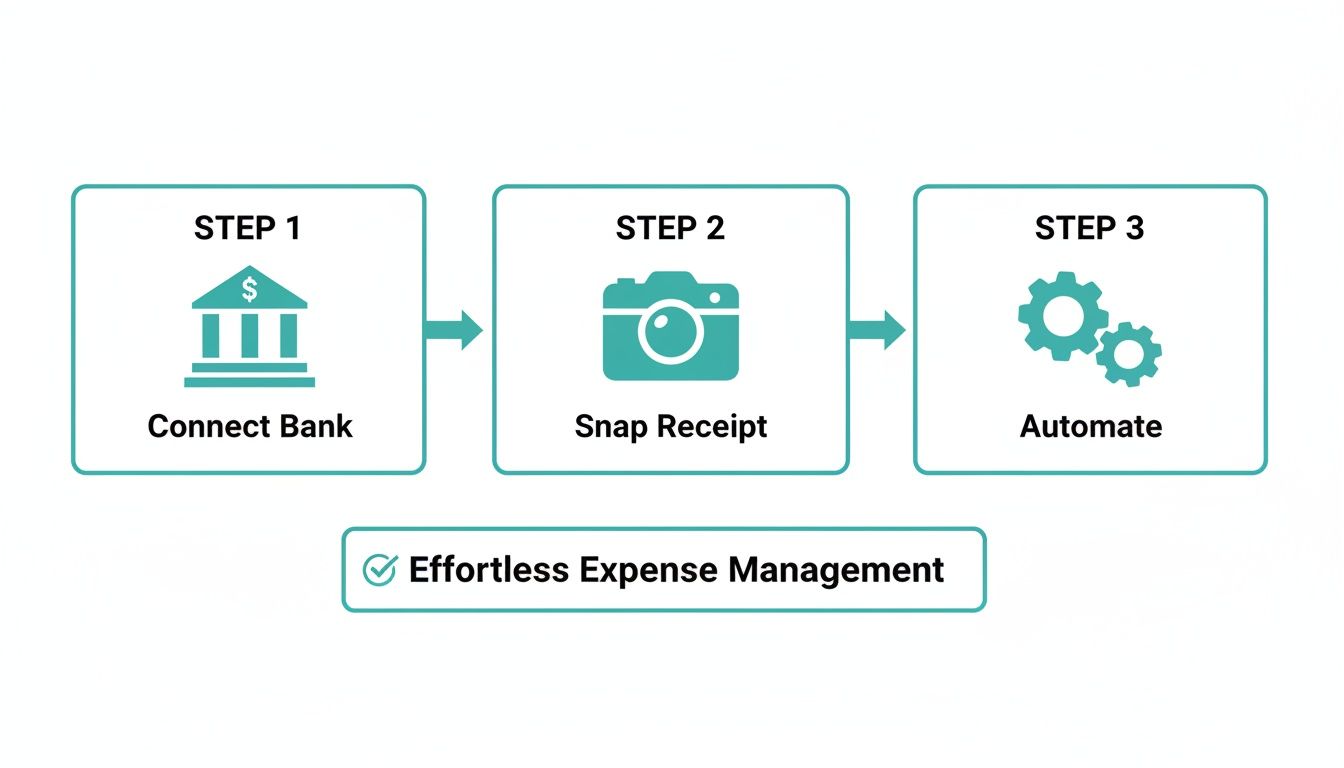
This simple three-step flow—connecting your bank, snapping receipts, and letting automation handle the rest—is the engine that powers your daily and monthly routines.
A Quick Guide to Monthly Reconciliations
At the beginning of each new month, grab the PDF statements for your business bank and credit card accounts for the month that just ended. Then, open the reconciliation tool in QuickBooks Online.
From there, you’ll:
- Enter the statement ending date and ending balance. This tells QuickBooks the target you’re aiming for.
- Check off matching transactions. Go through your statement and tick off each transaction in QBO that appears on it. The software keeps a running tally, and your goal is to get the "difference" down to zero.
- Investigate discrepancies. If a transaction is on the bank statement but not in QBO, you missed something and need to add it. If something is in QBO but not on the statement, it might be an error or a check that hasn't cleared yet. This is where you put on your detective hat and fix the issues.
Once the difference is $0.00, you click "Finish now," and QBO saves a formal reconciliation report. You've now locked in the accuracy of your books for that month. A key part of this involves managing vendor bills correctly, and you can learn more about perfecting your accounts payable process in our detailed guide. Adopting these routines ensures your financial data is always reliable and ready when you need it.
Navigating Tricky and Complex Expenses
Once you get the hang of tracking day-to-day costs like rent and software subscriptions, it starts to feel like second nature. But sooner or later, every business runs into expenses that just don't fit into a neat little box. These are the tricky transactions where things get messy, fast.
It’s easy to push these oddball expenses to the side and promise to deal with them later. But that’s a sure-fire way to create a massive headache come tax time. By tackling them head-on with a clear process, you’ll keep your books clean and make sure you’re not leaving any money on the table.
Handling Employee Reimbursements Correctly
When an employee dips into their own pocket for a business expense, you can't just cut them a check and call it a day. For the company to deduct that expense—and for the money not to count as taxable income for your employee—you need to have what the IRS calls an accountable plan.
Don't let the official-sounding name intimidate you. An accountable plan is really just a set of common-sense rules for how you handle reimbursements. It boils down to three simple requirements:
- It must be a business expense. A client lunch? That counts. A sandwich they grabbed on their own? That doesn't. There has to be a clear business connection.
- They need to provide proof. The employee has to give you a receipt or some other form of documentation in a reasonable amount of time, which is typically within 60 days.
- They have to return any extra cash. If you gave an employee an advance for a trip and they didn't spend it all, they must give the excess back to the company.
Following this framework creates a clean, audit-proof paper trail for any expense an employee covers on the company's behalf.
Demystifying Business Mileage and Travel
This one trips up a lot of business owners. The most important thing to understand is the difference between a deductible business trip and a non-deductible commute. Your daily drive from home to your main office is a commute, and you can't write it off.
However, plenty of other driving does qualify:
- Driving from your office to a client’s location.
- Traveling between multiple job sites or offices.
- Running business-specific errands, like a trip to the bank or post office.
The best way to track this is with a dedicated app like MileIQ or even a simple, detailed logbook. For every business trip, you absolutely must record the date, the purpose of the trip, your start and end points, and the total miles driven.
This kind of detailed tracking is more critical than ever. With global business travel expected to hit $1.64 trillion by 2025, smart companies are digging into every travel cost. According to a recent corporate travel study from Atlys, this level of scrutiny can slash waste by 15-20%.
A huge mistake I see all the time is owners trying to guesstimate their mileage at the end of the year. That's a massive red flag for the IRS. You need contemporaneous records—logs you create at the time of the travel, not months later. They are your best defense in an audit.
Job Costing for Service and Project-Based Businesses
If your business runs on individual projects—think marketing agencies, contractors, or consultants—just knowing your total expenses isn't enough. You have to know if each job is actually making you money. That's where job costing comes in.
Job costing is the process of assigning direct costs to specific projects. It gives you a true picture of your profitability, job by job.
These costs typically include:
- Direct Labor: The wages you pay employees for the specific hours they work on that project.
- Direct Materials: Any supplies you had to buy just for that one job.
- Subcontractors: Any payments you made to freelancers or other companies who helped out.
By tagging these expenses to a particular job in your accounting software, you can run a Profit & Loss report for that project alone. This isn't just about record-keeping; it's a powerful strategic tool. It tells you which projects are your winners and helps you make smarter decisions about what kind of work to take on next. This concept is closely related to understanding your overall financial health, which we cover in our guide to Cost of Goods Sold.
Turning Good Records into a Stress-Free Tax Season

This is where all your hard work pays off. The diligent effort you've put into tracking expenses throughout the year comes to a head during tax season, and the dividend is massive: peace of mind.
Instead of scrambling through a shoebox full of faded receipts, you’ll have a clean, organized set of books ready to hand off. This transforms tax prep from a dreaded, stressful chore into a straightforward, almost simple, process. Your consistent daily and monthly routines are what make this possible—by categorizing every transaction as it happens, you've already done 90% of the work.
Clean Data Is Your Key to Maximizing Deductions
When your expenses are neatly sorted, you and your accountant can see exactly where your money went at a glance. That clarity is your single best tool for legally minimizing what you owe. A well-organized system means no legitimate deduction gets overlooked simply because you forgot what a random debit card charge from last April was for.
With everything in its place, generating the reports your tax pro needs is just a matter of clicking a few buttons. The main reports they'll ask for are:
- The Profit & Loss (P&L) Statement: This is the big one. It summarizes your revenue and all your expenses, giving you the net profit figure your taxes are based on.
- The Balance Sheet: This report provides a snapshot of your company’s financial health, showing your assets, liabilities, and equity.
- General Ledger Detail: Think of this as the complete transaction history that backs up the P&L and Balance Sheet. It’s the proof in the pudding.
Having these accurate reports on hand means your accountant can focus on tax strategy, not on deciphering your records. For a complete list of what you'll need, our small business tax preparation checklist can help you gather everything in one place.
Building an Audit-Proof Record Retention System
Filing your taxes isn't the final step; you also have to be able to back up the numbers you submitted. The IRS has pretty specific rules about how long you need to keep business records, and following them is your best defense against the stress of a potential audit.
As a general rule, you should keep all supporting business documents for at least three years from the date you file your tax return. However, if you underreport income by more than 25%, the IRS has up to six years to challenge your return, so many accountants advise keeping records for seven years to be safe.
A solid record retention system should include digital copies of:
- Receipts and invoices for every single expense you claim.
- Monthly bank and credit card statements.
- Past tax returns.
- Payroll records, if you have employees.
I always recommend keeping these files organized in a secure, cloud-based folder. That way, if you ever need them, they’re just a few clicks away.
Your Final Year-End Review
Before you send everything off to your accountant, take the time to do one last review of your books for the year. This is your chance to be a hero and spot any last-minute deductions that might have been missed or miscategorized.
Scan through major expense categories like travel, meals, and professional development. For example, business travel costs are on the rise, with daily attendee expenses projected to hit $169 in 2025. By meticulously tracking these expenses, businesses can save 10-25% through clear policies and automation. You can find more insights on how to save on business travel at engine.com. This final check ensures every eligible expense is captured, paving the way for a smooth, stress-free tax season.
When Should You Stop Doing Your Own Books?
Sooner or later, every business owner hits a wall. You started out doing everything yourself, and that includes the bookkeeping. But now, you're spending your evenings and weekends buried in spreadsheets and stacks of receipts instead of focusing on what you're actually good at—growing your business.
This is the classic tipping point. The time you're pouring into administrative tasks starts to cost you more in lost opportunities than what you're saving by not hiring a pro.
Signs You've Reached the Outsourcing Tipping Point
How do you know you're there? It's less about a specific revenue number and more about a gut feeling backed by some pretty clear signals.
One of the biggest red flags is a nagging uncertainty about your numbers. Are they really right? Are you accidentally leaving money on the table come tax time? When you start second-guessing the very data you need to make critical decisions, you've outgrown your DIY setup. Guesswork is no way to run a company.
The true cost of handling your own bookkeeping isn't just the hours you lose. It's the forward momentum you sacrifice. Every minute you spend wrestling with QuickBooks is a minute you're not out there making a sale, talking to customers, or innovating.
This is where bringing in a firm like Bugaboo Bookkeeping becomes less of a cost and more of a strategic move. You're not just handing off a task list; you're gaining a partner who makes sure your financial foundation is solid, compliant, and ready for whatever comes next.
Ask yourself if any of these sound familiar:
- You're growing fast: Sales are up, which is great, but your cash flow feels like a chaotic mess you can't get a handle on.
- Things are getting complicated: You've hired your first employees, started carrying inventory, or need to figure out how profitable each project really is.
- You dread tax season: Prepping for your accountant is a frantic, multi-week nightmare that throws your entire business off track.
If you found yourself nodding along, it's probably time to have a conversation. Bringing in an expert bookkeeper gives you back two of your most valuable assets: rock-solid financial clarity and the freedom to be the CEO again.
Have Questions? We've Got Answers.
Even the best expense tracking system can leave you with a few lingering questions. It's totally normal. Here are some of the most common things we get asked by small business owners who are just getting the hang of it.
What's the Easiest Way for a Freelancer to Track Expenses?
For freelancers, the absolute simplest (and most effective) way to go is using an accounting tool like QuickBooks Online with its mobile app. Seriously, it's a game-changer.
Once you connect a dedicated business bank account, all your transactions automatically feed into the software. Then, whenever you buy something for your business, you just snap a picture of the receipt with the app. You can categorize it right there on the spot—no more shoeboxes full of receipts or messy spreadsheets.
How Long Should I Keep My Business Receipts?
The official IRS line is that you need to keep records to support your tax returns for at least three years after you file. But ask any seasoned accountant, and they’ll likely tell you to hang onto them for seven years, just to be on the safe side.
The best move? Go digital. Scan everything and save it in a secure cloud folder.
Digital copies aren't just for compliance; they're your best defense. Physical receipts fade, get lost, or end up as coffee coasters. A well-organized digital archive is forever—it's searchable proof for every single deduction you claim.
Can I Claim Expenses I Paid for With My Own Cash?
Yes, you can, but you have to do it the right way to keep your bookkeeping clean. You can't just mentally note it; you need to create a formal reimbursement for yourself.
Think of yourself as an employee. Submit an expense report with the receipt for what you bought with your personal cash. Then, use your business bank account to pay yourself back for that exact amount. This creates a crystal-clear paper trail that proves a legitimate business expense was paid from the business's funds.
If you're nodding along to these questions and feel like you'd rather have an expert handle all this, we're here to help. Bugaboo Bookkeeping can take the entire expense tracking process off your plate for good.
Get a free consultation and let's talk about getting your time back.