Getting your business receipts organized is about more than just cleaning up a messy shoebox. It’s about creating a bulletproof digital system that captures every single transaction, categorizes it correctly, and stores it where you can find it in seconds.
The entire strategy hinges on one simple habit: digitize every paper receipt the moment you get it. Using a mobile app and a logical cloud folder structure is the key. This single shift stops you from losing valuable deductions and gives you a crystal-clear, up-to-the-minute view of your company's financial health.
Why Your Receipt Shoebox Is a Business Bottleneck
We’ve all been there. The shoebox overflowing with crumpled receipts, the glove compartment that can’t hold another gas slip, or even that "receipts" folder on your desk that’s about to explode. It might feel like you're keeping things organized, but in reality, you've created a major bottleneck that's quietly draining your time and money.
This isn't just about clutter. Disorganization creates real financial headaches that can hold your business back and add a ton of stress you just don't need.

The Hidden Costs of Manual Receipt Tracking
Think about it: every minute you spend sorting through paper, trying to read faded ink, or manually punching numbers into a spreadsheet is a minute you aren't spending on making money. This manual grind isn’t just inefficient; it’s a direct hit to your bottom line.
And it's a huge problem. Recent research found that 71% of finance leaders say their outdated tracking systems make it difficult to manage compliance and prevent fraud. This is a big deal, and the fallout from a messy, paper-based system can be surprisingly painful.
- Missed Tax Deductions: A lost receipt for a valid business lunch or a piece of equipment is literally leaving money on the table for the IRS. These "small" misses can easily add up to thousands of dollars in lost deductions over a year.
- Flawed Financial Reporting: If your expense data is missing or just plain wrong, you can't trust your financial reports. That makes it impossible to make smart decisions about your budget, pricing, or when to invest in growth.
- Audit Anxiety: No one loves the thought of an IRS audit. But with a disorganized pile of receipts, that anxiety turns into a full-blown nightmare, potentially leading to fines and penalties.
- Delayed Reimbursements: If you have a team, a clunky receipt process forces employees to wait forever to get paid back. This causes frustration and creates an administrative logjam for everyone.
The real problem with a manual receipt system is that it forces you to be reactive. You’re always playing catch-up, trying to solve a financial puzzle from weeks or months ago instead of working with clean, real-time data.
Ultimately, learning how to organize business receipts isn't just a bookkeeping chore—it's a strategic business decision. For a more detailed look, our guide on how to track business expenses offers a complete picture. Making the switch to a digital-first system gives you true financial clarity, saves you countless hours, and empowers you to build a stronger, more resilient business.
Setting Some Ground Rules for Your Receipts
A bulletproof system for organizing business receipts doesn’t start with fancy software. It starts with simple, consistent rules that everyone follows. Before you even download an app, you need to decide what a "complete" receipt actually looks like for your business. This one step will save you countless headaches and make sure every expense is properly documented right from the get-go.
Think of it as creating a mini-policy, even if you're a team of one. The idea is to make the process automatic, so there’s no guesswork when you’re in the middle of a busy day. When you or an employee gets a receipt, everyone needs to know exactly what information to capture and when it’s due.
What Makes a Receipt "Complete"?
A receipt is only useful if it tells the whole story of a transaction. For the IRS and your own bookkeeping, this means grabbing a few key details every single time. A faded piece of thermal paper with just a total on it won't do you any good if you're ever audited.
Your internal rulebook should require every single receipt to clearly show:
- Vendor Name: Who did you pay? Seems basic, but it’s critical for categorizing expenses.
- Transaction Date: When did the purchase happen? This is non-negotiable for accurate monthly and quarterly reports.
- Itemized List of Purchases: What exactly did you buy? An itemized list is your proof that the expense was for business. A credit card slip showing only the total from Costco just isn't enough.
- Total Amount Paid: What was the final damage, including any taxes or tips?
- Payment Method: How was it paid? Knowing if it was the Amex business card, a debit card, or cash makes reconciling your bank statements 10x faster.
Creating this simple checklist is the best way to get rid of "mystery receipts" that show up with zero context. You'll stop chasing down details after the fact and start getting complete information from day one.
Set a Firm (but Fair) Deadline
The quickest way for any receipt system to fall apart is letting them pile up. Trying to remember the details of a purchase from three months ago is nearly impossible. To stop this from happening, you need a firm submission deadline.
If you’re running the show solo, a great habit is to scan your receipts at the end of each day or, at the absolute latest, once a week. If you have a team, a weekly deadline works wonders. A simple "all receipts from this week must be submitted by Friday at 5 PM" is a game-changer.
This one rule prevents the dreaded end-of-the-month shoebox scramble and keeps your financial data fresh. Having current records is the backbone of good bookkeeping, and you can see how it plays into the bigger picture on our small business tax preparation checklist. By setting clear expectations upfront, you build a reliable workflow that keeps your books accurate and audit-ready.
Choosing Your Digital Receipt Organization Tools
Moving away from a shoebox full of paper receipts is a huge step. But the right digital tools are what make the transition stick. The goal isn't just to scan receipts; it's about building a smooth workflow that captures, sorts, and stores your financial data without eating up your time.
The best tool for you really comes down to how your business operates. A freelance photographer might just need a quick mobile app to snap photos of receipts between shoots. On the other hand, a small contractor buying materials multiple times a day is better off with a dedicated desktop scanner for a weekly batch session.
The key is to find something that fits into your existing routine. If a tool feels like a chore, you won't use it consistently.
Matching the Tool to Your Business Needs
Not all receipt management tools are built the same. Your transaction volume, team size, and what accounting software you’re already using will all point you toward the right solution. There’s a reason this market is booming—the global market for cloud-based receipt management is projected to hit USD 11.36 billion by 2034. According to market analysis, the biggest driver is apps that use OCR to automatically capture receipt data.
Let's look at the main options you have:
-
Standalone Mobile Scanning Apps: These are perfect for solopreneurs and small-scale operations. Apps like Scannable or Microsoft Lens use your phone’s camera to create clean, high-quality scans. Most now include Optical Character Recognition (OCR), which is a lifesaver—it automatically pulls the vendor, date, and amount right off the receipt, so you don't have to type it all in.
-
Expense Tracking Software: A step up from simple scanners, tools like Expensify or Dext are designed for expense management. They scan, help you categorize expenses, create reports, and often sync directly with your accounting software. They're fantastic if you have employees who need to submit receipts for reimbursement.
-
All-in-One Accounting Software: Platforms like QuickBooks Online or Xero have receipt capture built right in. For many businesses, this is the most direct route. You scan a receipt, and it lands right inside your accounting system, ready to be matched with a bank transaction. It cuts out a lot of extra steps.
No matter which tool you pick, the fundamental process should be simple: capture the receipt, check that the data is correct, and get it into your books.
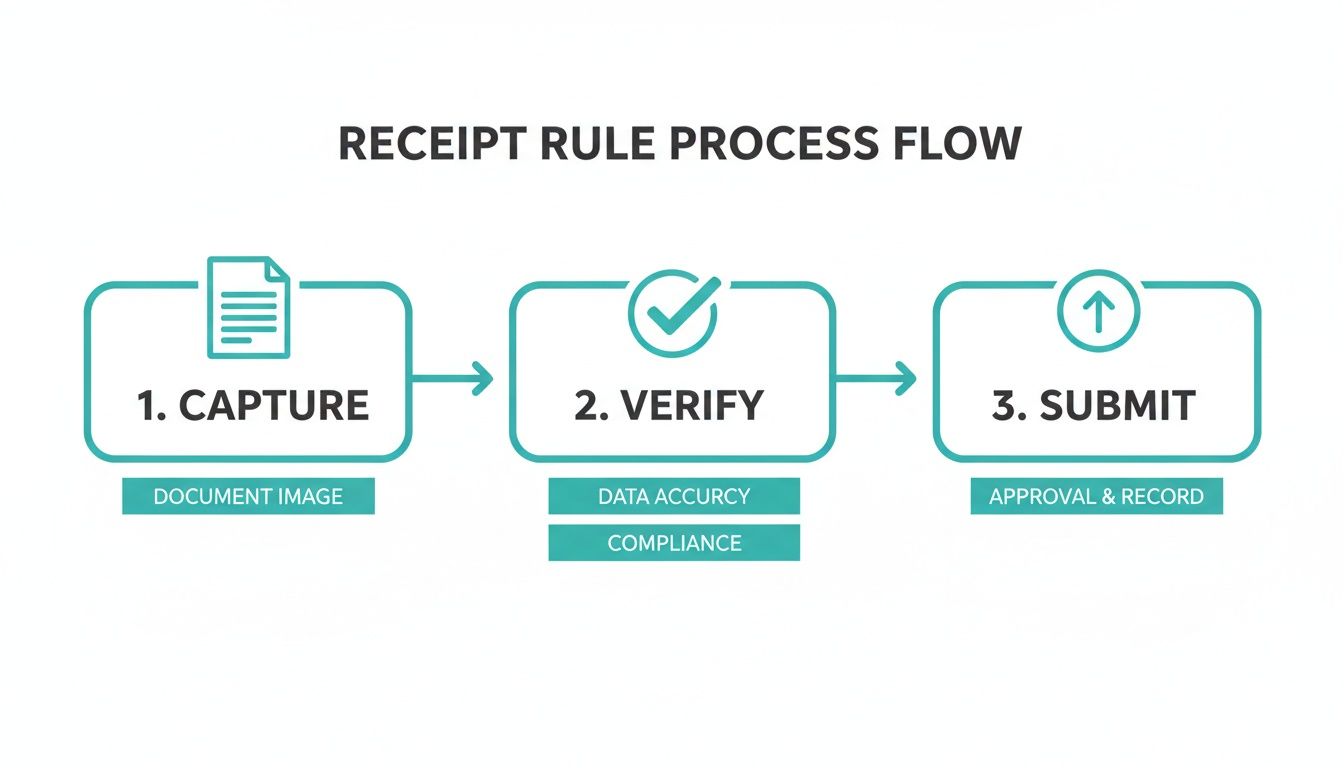
This simple flow is the backbone of any good system. Keep it in mind as you evaluate your options.
Deciding on the right approach can be tricky, so here’s a quick breakdown to help you compare the most common methods.
Comparison of Receipt Organization Methods
| Method | Tools Required | Pros | Cons | Best For |
|---|---|---|---|---|
| Manual | Physical folders, envelopes, shoebox | No cost, simple to start | Time-consuming, high risk of loss/damage, difficult to search | Hobbyists or businesses with very few monthly transactions |
| Semi-Digital | Smartphone camera, scanner, cloud storage (e.g., Google Drive) | Low cost, creates digital backup, easy to share with an accountant | Requires manual data entry, organization can become messy | Solopreneurs and freelancers comfortable with managing digital files |
| Fully Automated | Receipt scanning app, expense tracking software, accounting platform | Saves significant time, reduces errors with OCR, integrates with accounting | Subscription costs, initial setup can be complex | Growing businesses, teams, and anyone who values efficiency over cost |
Ultimately, the best method is the one you'll actually follow. An automated system is powerful, but only if you use it consistently.
Building Your Technology Stack
Your receipt app shouldn't be a dead end. The most effective setups are integrated. For example, you might use a mobile scanner that automatically saves receipts to a dedicated Google Drive folder, which your bookkeeper can then access directly. Our guide on essential bookkeeping tools for small businesses shows how these different pieces can work together.
The ultimate goal is to build a "capture-to-reconciliation" pipeline. A receipt should flow smoothly from a photograph on your phone directly to a reconciled transaction in your accounting software with as few manual touchpoints as possible.
Before you commit to a tool, think about the entire journey of a receipt. Does the app talk to your accounting platform? Can you export data in a format your accountant can actually use? Answering these questions now will save you from major headaches down the road and make organizing your business receipts feel almost effortless.
Creating a Digital Filing System That Actually Works
Let's be honest: just scanning receipts and tossing them into a folder isn't a system. It’s just trading a physical shoebox for a digital one. A cluttered cloud drive full of files named SCAN_001.pdf is just as useless when you're trying to find something specific.
The goal here is to build a logical, scalable filing system that you can practically set and forget. This isn't just about satisfying a need for tidiness. When your bookkeeper asks for every travel receipt from last March, you should be able to pull them up in less than 30 seconds. A solid system makes tax time, expense reports, and potential audits a complete non-issue.
Design a Logical Folder Structure
Your digital archive's backbone is its folder structure. You need something intuitive that grows with your business, not something you have to reinvent every year. For most small businesses using cloud storage like Google Drive or Dropbox, a chronological and categorical approach is foolproof.
Start with a main folder—something simple like "Business Receipts." Inside that, create a folder for the current year (e.g., "2024").
From there, you’ve got two solid options. Pick the one that matches how your brain works:
- Month First, Then Category: This is my go-to for businesses with a consistent flow of different expenses each month. It keeps things neatly bundled by time.
- The path looks like this:
2024 / 03-March / Office Supplies
- The path looks like this:
- Category First, Then Month: This method is perfect if you prefer to see all your spending for a specific category grouped together throughout the year.
- The path looks like this:
2024 / Travel / 03-March
- The path looks like this:
The key is to make sure your expense categories mirror what’s in your accounting software. If you're not sure what those should be, our guide on setting up a chart of accounts for your business is a great place to start.
Whatever you decide, the most important rule is to stick with it. Consistency is everything.
Create a Standard File Naming Convention
If folders are the skeleton, your file names are the labels that make everything searchable. A great naming convention tells you exactly what a receipt is for without you ever having to open the file. It turns a digital junk drawer into a sortable database.
Here’s a format I’ve found to be incredibly effective: YYYY-MM-DD_Vendor_Amount.pdf
Let's break down why this works so well:
- YYYY-MM-DD: Starting with the date is non-negotiable. It forces all your files to sort themselves chronologically. Always use the
2024-05-21format, notMay-21-2024. - Vendor: Put the name of the store or person you paid. Keep it consistent—always use "Staples," not a mix of "Staples Inc" or "SPLS."
- Amount: Adding the transaction total makes it incredibly easy to spot a specific purchase when you’re scrolling through a list of files.
Pro-Tip: I often take it one step further by adding a quick description. Something like
2024-05-21_Amazon_78.45_PrinterInk.pdfgives you an extra layer of searchable detail. It might seem small, but it's a massive time-saver.
With this simple structure—logical folders and standardized filenames—you’ve built a powerful, self-organizing archive. Filing a new receipt takes just a few seconds, and you’ll have complete confidence that you can find any document you need, right when you need it.
So, you’ve got a perfectly organized digital filing cabinet for your receipts. That’s a huge win, but it's really only half the battle. The real magic happens when you connect those organized files to your accounting software and let automation take over. This is how you turn a tidy system into a powerful, time-saving machine.
Think about it: your accounting platform could automatically find a scanned receipt and match it perfectly to the transaction that just came through from your bank. This isn't some far-off dream—it's a standard feature in modern bookkeeping that all but eliminates manual data entry and keeps your books consistently accurate.
Connecting Bank Feeds to Your Accounting Software
First things first, you need to connect your business bank and credit card accounts directly to your accounting software, whether you're using QuickBooks Online or Xero. This creates what we call a bank feed—a live stream of all your transactions flowing right into your books.
Once that feed is active, every single debit, credit, and charge shows up in your software, just waiting for you to categorize it. This one move gets rid of the soul-crushing (and error-prone) task of typing in transactions from a paper statement. Your bank feed becomes the single source of truth for all your financial activity.
Using Software Rules to Automate Categorization
Now for the fun part. With your bank feed humming along, you can teach your software how to handle all those recurring transactions by creating rules. This is where you’ll start reclaiming dozens of hours every month. A rule is just a simple instruction telling your software what to do when it sees a transaction from a specific place.
For instance, you can set a rule that says, "All transactions from 'Office Depot' should be categorized as 'Office Supplies'."
Once that rule is live, every future purchase you make at Office Depot will be automatically coded correctly. You don't have to lift a finger. Think of all the regular expenses you can do this for:
- Gas Stations: Set up a rule to categorize all Shell or Chevron purchases as 'Fuel Expense'.
- Software Subscriptions: Automatically code every payment to Adobe or Microsoft as 'Software & Subscriptions'.
- Utilities: Tell the software to assign every payment to Puget Sound Energy as 'Utilities'.
The goal is to automate the predictable. Spend an hour setting up rules for your top 10-15 most frequent vendors, and you can easily automate over 80% of your transaction coding. Your job instantly shifts from tedious data entry to just reviewing the few exceptions the software flags for you.
The Reconciliation Workflow
Putting it all together, your new workflow is beautifully simple. You snap a picture of a receipt, and the mobile app sends it to your accounting software. At the same time, your bank feed pulls in the matching transaction from your bank. The software then uses its smarts to pair the two.
This whole process creates a complete, audit-proof record for every single expense. You have the receipt proving what was bought and the bank transaction confirming how it was paid. This connection is the backbone of accurate financial reporting. If you want to learn more about what these reports tell you, take a look at our guide on understanding profit and loss statements.
This isn't just about saving time. It's about having real-time clarity into your finances, empowering you to make smarter business decisions based on data that's always up-to-date.
Common Questions About Organizing Business Receipts
Even with a rock-solid system, you're bound to run into specific situations that make you pause and wonder if you're doing things right. When you're learning how to organize business receipts, a few practical questions always seem to pop up. Getting those details sorted is the key to feeling confident and staying compliant.
Let's dive into some of the most common questions I hear from business owners about managing their receipts.
How Long Do I Need to Keep Business Receipts?
The official IRS line is that you should keep business records for three years after filing your return. That’s the standard window for most audits. But if you ask me or most other bookkeepers, we’ll tell you to hang onto them for seven years.
Why the extra time? Simple: it’s better to be safe than sorry. The audit window can actually stretch out longer in certain cases, like if you significantly underreport income. With a digital system, keeping records for seven years—or even indefinitely—is practically free and takes up zero physical space. It's the ultimate peace of mind.
Are Digital Copies of Receipts Legally Valid?
Yes, one hundred percent. The IRS fully accepts digital copies of receipts as long as they meet a few basic requirements. Your scanned copy just needs to be a clear, legible, and complete version of the original.
According to IRS guidelines, your electronic storage system just needs to ensure the records are secure, can be indexed and retrieved, and are readable.
This is your official green light to go paperless. Once you have a quality digital backup saved in your organized system, you can confidently shred the physical clutter. Your records will be far more secure and easier to find than they ever were in a filing cabinet.
What Is the Best Way to Handle Cash Receipts?
Ah, cash receipts. They're tricky because, unlike a credit card swipe, there's no automatic digital trail. The only way to win this game is to get into the habit of capturing them on the spot.
The second a cash receipt lands in your hand, pull out your phone and use a scanning app to snap a picture. If you can't do it right then, create a "danger zone" for them—a specific pocket in your wallet or a dedicated envelope. Then, make it a non-negotiable part of your end-of-day or weekly wrap-up to scan and file that little pile.
Pro-Tip: When you save the file, add a quick note to the filename about why you spent the cash. Something like 2024-06-15_Local-Hardware_25.15_BoltsForClientJob.pdf is perfect. Trust me, that little bit of context is a lifesaver months down the road.
When Should I Outsource My Receipt Management?
This one’s easy. You should think about outsourcing the moment the time you spend wrangling receipts costs you more in lost opportunities than it would to hire a pro. If the admin work is pulling you away from actually making money, that's your sign.
Other red flags to watch for:
- You’re constantly behind on your books.
- You can never find the receipts you need for major tax deductions.
- You dread tax season because you know it's going to be a stressful mess.
Bringing in a professional bookkeeper means they'll set up and run an efficient system for you. This frees you up to focus on what you actually love to do: run your business.
Feeling like you've hit that point? The team at Bugaboo Bookkeeping can take receipt management, bookkeeping, and payroll completely off your plate. Learn more about our services and get back to growing your business.